
Download Wyliodrin STUDIO – IoT, Programming, Desktop Application
Overview
Wyliodrin STUDIO is a desktop application designed for developers and educators working in the Internet of Things (IoT) space. It provides a comprehensive environment for creating, testing, and managing software and firmware for a variety of hardware platforms. The software supports multiple programming languages and offers tools for device connectivity, project management, and real-time data visualization. Its primary purpose is to streamline the development workflow for embedded systems and IoT projects, especially for users working with devices such as the Raspberry Pi, Arduino, UDOO Neo, and BeagleBone Black.
The platform is particularly suited for students, hobbyists, and professionals in electronics and software engineering who need a unified interface to manage both hardware and software components. It enables users to connect devices via TCP/IP, SSL, or serial ports, develop firmware using Python, JavaScript, Bash, or visual programming, and monitor sensor data through an integrated dashboard. The software also includes a file explorer, task manager, and network connection manager, making it a versatile tool for managing complex IoT setups.
Wyliodrin STUDIO is released under the GPLv3 license for noncommercial and educational use, with commercial licensing available upon request. The developer, Wyliodrin, has focused on creating a secure, cross-platform tool that supports a wide range of devices and programming environments. While specific details about the development team or company background are not provided, the software’s feature set suggests a strong focus on open-source collaboration and educational accessibility.
Key Features & Capabilities
- Device Connectivity – Supports TCP/IP, SSL, and serial port connections to a range of IoT devices, enabling seamless communication between the desktop and hardware.
- Multi-Language Development – Offers support for Python, JavaScript, Shell Script (bash), and visual programming that translates to Python, allowing developers to choose their preferred coding environment.
- Project Management – Includes tools for importing and exporting Wyliodrin STUDIO projects, ensuring portability and collaboration across different systems.
- Visual Dashboard – Provides real-time visualization of sensor data, helping users monitor device performance and environmental inputs dynamically.
- Hardware Schematics – Displays device hardware schematics directly within the interface, aiding in debugging and understanding circuit layouts.
- Package Management – Offers tools to manage Python and JavaScript packages, simplifying dependency handling during development.
- Task and Network Management – Features a task manager for device operations and a network connection manager for configuring Ethernet and WiFi connections.
- Interactive Documentation – Includes built-in resources such as resistor color code calculators and interactive electronics guides to support learning and troubleshooting.
- Example Projects and API Docs – Provides ready-to-use example firmware and comprehensive API documentation in C/C++, Python, and JavaScript.
- Shell Access – Grants direct shell access to connected devices, allowing for advanced configuration and debugging.
These features collectively enable users to develop, deploy, and monitor IoT applications efficiently. For instance, a student can use the visual programming interface to build a temperature monitoring system, while a professional might leverage shell access and package management to deploy a custom firmware update across multiple Raspberry Pi units.
User Interface, Workflow & Performance
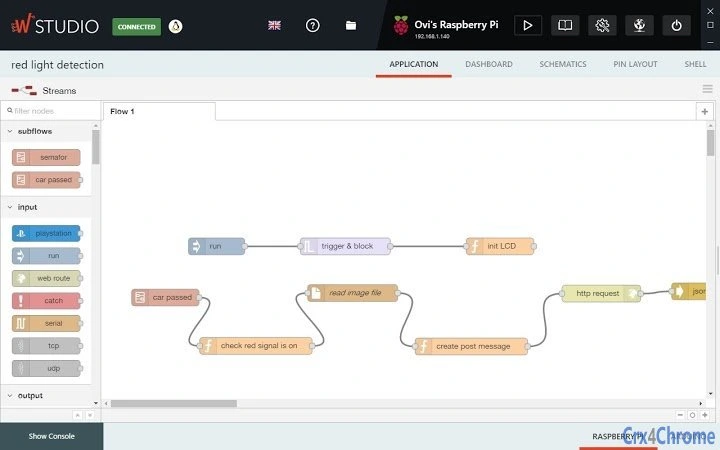
The user interface of Wyliodrin STUDIO is structured to support both beginners and experienced developers. It features a centralized dashboard with clearly labeled panels for device connection, project management, and data visualization. Navigation is intuitive, with context-sensitive menus and toolbars that adapt based on the selected device or project.
Workflow efficiency is enhanced by the integration of multiple tools within a single environment. Developers can switch between writing code, monitoring sensor output, managing packages, and configuring network settings without leaving the application. The visual dashboard and hardware schematics are particularly useful for real-time feedback and debugging, reducing the time needed to identify and resolve issues.
Performance details were not specified by the developer. However, based on the software’s size of 200 MB and its cross-platform nature, it is expected to run efficiently on modern Windows and Mac systems. The developer did not provide additional system requirements or resource usage details. Stability is assumed to be consistent with typical desktop applications of similar scope, though actual behavior may vary depending on device load and network conditions.
Compatibility & System Requirements
Wyliodrin STUDIO is compatible with both Windows and Mac operating systems, making it accessible to a broad user base. The software is available in version 1.0 and has a file size of 200 MB, which suggests a moderately sized application with a range of built-in tools and libraries.
Exact system requirements were not listed. The developer did not specify minimum CPU, RAM, or storage needs. Platform compatibility information is limited to the supported OS types. Users are advised to ensure their system meets general standards for running desktop applications, particularly those involving network communication and hardware interfacing.
Pros and Cons
Pros
- Supports multiple programming languages and visual programming
- Integrated visual dashboard for real-time sensor data
- Comprehensive project import/export functionality
- Direct shell access and task management for devices
- Interactive electronics documentation and example projects
- Free for noncommercial and educational use under GPLv3
- Wide device compatibility including Raspberry Pi, Arduino, and BeagleBone
Cons
- Exact system requirements were not provided
- No information on update frequency or release cycle
- Limited documentation on performance under heavy load
- Commercial use requires separate licensing agreement
- Platform-specific installation steps may vary
FAQ Section
Is Wyliodrin STUDIO available for Windows and Mac?
Yes, the software is compatible with both Windows and Mac operating systems.
Can I use Wyliodrin STUDIO for commercial projects?
For commercial use, a separate license is required. Users should contact [email protected] for licensing details.
What programming languages does it support?
Wyliodrin STUDIO supports Python, JavaScript, Shell Script (bash), and visual programming that translates to Python.
Is the software secure?
While the developer did not provide specific security details, the software is distributed under the GPLv3 license, which emphasizes transparency and open-source integrity. Users are advised to follow standard security practices when connecting to devices.
How do I update the software?
Update procedures were not specified. Users should check the official website or contact the developer for the latest version and update instructions.
Final Thoughts + CTA
Wyliodrin STUDIO stands out as a powerful, open-source desktop application tailored for IoT development and education. Its rich feature set, including device connectivity, multi-language support, and real-time data visualization, makes it a valuable tool for developers and learners alike. The inclusion of interactive documentation, example projects, and package management further enhances its usability.
While system requirements and performance data are not fully detailed, the software’s cross-platform availability and free access for educational use make it highly accessible. It is particularly beneficial for students, educators, and hobbyists working on embedded systems and IoT projects.
For those seeking a secure, versatile, and feature-rich environment to build and manage IoT applications, Wyliodrin STUDIO delivers strong value. Download Wyliodrin STUDIO now to begin your next project with confidence.







